When extracting one of the installation zip files in Windows 10 PC, this error message: Error 0x80010135 “Path Too Long” appears. The error is caused when you use Windows Explorer or WinZip to extract files and find a path that exceeds the maximum number of characters.
0X80010135 Error
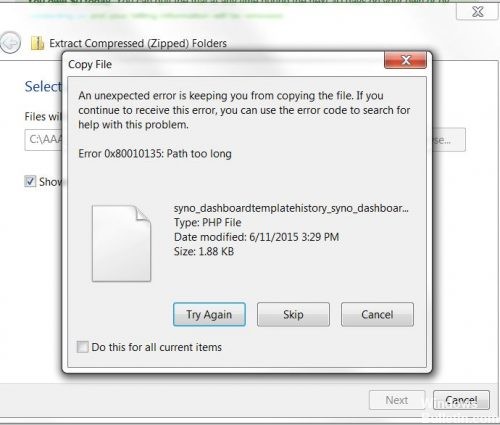
Almost all computer users have problems copying, deleting or renaming files with one of these messages such as file name too long, not erasable, access denied or destination path too long. This happens because Windows/FAR is not able to copy, delete or rename path names longer than 256 characters. When working on one or more files with longer file names, you may be confused by error messages that seem incomprehensible. If you also encounter a similar problem and one of those error messages like: Path too long or access denied, then don’t panic, we help you do your job effortlessly.
To solve this problem, use a decompression program like 7-Zip that can handle long file paths. Otherwise, extract the files to the root directory or c:/temp.
Here are the steps to help you solve this Windows problem:
Try extracting it to the root folder.
How To Fix 0X80010135 Error
Windows has a limit of 260 characters in pathnames, so if the Zip file is placed in a folder (including the desktop), the files contained in the Zip file may exceed this limit and cannot be extracted.
Placing the ZIP file at the root of the system disk is the surest way to avoid this problem.
0X80010135 Error
Almost all computer users have problems copying, deleting or renaming files with one of these messages such as file name too long, not erasable, access denied or destination path too long. This happens because Windows/FAR is not able to copy, delete or rename path names longer than 256 characters. When working on one or more files with longer file names, you may be confused by error messages that seem incomprehensible. If you also encounter a similar problem and one of those error messages like: Path too long or access denied, then don’t panic, we help you do your job effortlessly.
To solve this problem, use a decompression program like 7-Zip that can handle long file paths. Otherwise, extract the files to the root directory or c:/temp.
Here are the steps to help you solve this Windows problem:
Try extracting it to the root folder.
How To Fix 0X80010135 Error
Windows has a limit of 260 characters in pathnames, so if the Zip file is placed in a folder (including the desktop), the files contained in the Zip file may exceed this limit and cannot be extracted.
Placing the ZIP file at the root of the system disk is the surest way to avoid this problem.

I have another solution that I got fantastic result from. Try LongPathTool for easy solution.
ReplyDeleteThanks for your suggestion!
DeleteUse Long Path Tool, Long Path Tool can simplify and probably end your problems in unlocking, managing and renaming files that appear to have a long filename.
ReplyDelete